Work instructions
Build, review and release step-by-step instructions with parts, checks and labels.
Instruction Control lists every assembly with its instruction status: released coverage, drafts, versions in review and assemblies still missing instructions.
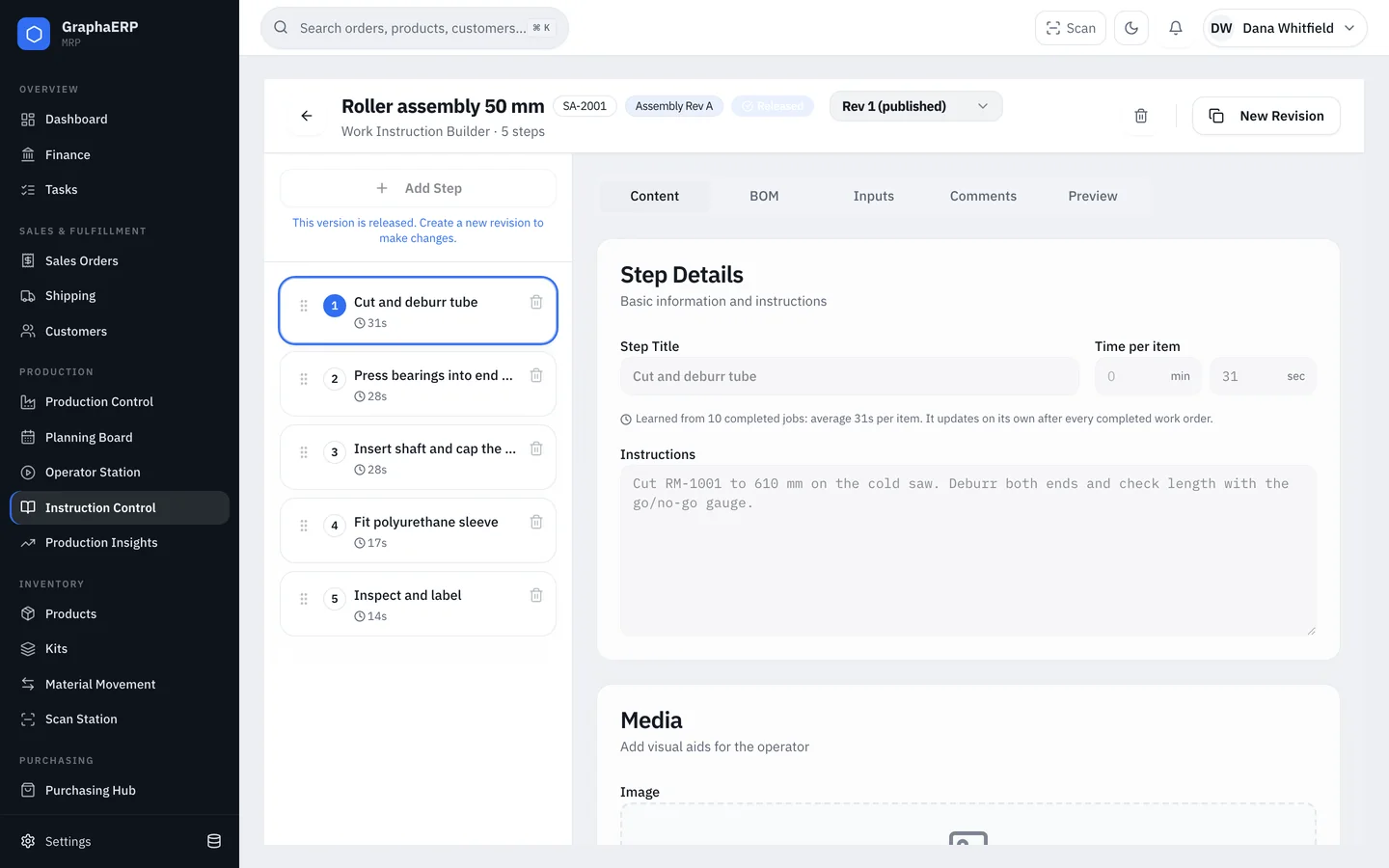
Building instructions
- Steps — title, instructions, and a photo or video. Paste images straight into a step.
- Time per item — minutes and seconds per produced unit.
- BOM — assign each component of the assembly to the step where it is used, so operators pick the right parts at the right time.
- Inputs — number, text, checkbox or photo fields the operator must record, such as a measurement or serial number.
- Labels — attach a ZPL label with a live preview and an optional size. Print one per job or one per unit, and override the printer per step.
Saving
Every edit — including reordering and removing steps — is pending until you Save (Ctrl/Cmd + S). The header shows how many changes are pending, Discard undoes them, and you are warned before leaving with unsaved work.
Revisions, review and release
Submit a version for approval, then release it. A released version is read-only; to change it, create a New Revision. Work orders use the released version of their assembly's instructions.
Learned estimates
After every completed job, each step's time per item becomes the average over all completed jobs, including earlier revisions of the same step. The builder shows how many jobs the estimate is based on.